You have a character with a world behind it. Maybe it is a webtoon you have been writing for two years, or an original IP your company owns but has never animated. The question is no longer whether AI can produce animation. The question is whether it can produce your animation, with your character, your style, your story, across multiple episodes.
That distinction matters. Most AI video tools are built for one-off clips. Building a series requires something different.
What an AI Animation Series Actually Requires
A single clip and a series are not the same production problem.
For a series, you need four things to hold across every episode: your character’s appearance, the visual style of the world, a production pipeline you can repeat, and output that does not require rebuilding from scratch each time.
General-purpose text-to-video tools (Sora, Runway, Kling used in isolation) produce strong single clips, but they are not designed around series continuity. Each prompt is essentially a fresh start. Keeping the same character face, costume details, and lighting style across ten episodes using these tools alone requires significant manual effort.
The production approaches that are working in 2026 treat the AI model as one component inside a structured pipeline, not the whole solution.
How Studios Are Doing It Now
Three recent cases give a useful picture of what is actually possible.

CJ ENM, Cat Biggie (2025). South Korean media company CJ ENM produced a 30-episode non-verbal animation series using an in-house AI pipeline. The series took five months with a team of six, covering planning through character development. A comparable 5-minute 3D animation episode typically requires three to four months per episode using traditional methods. The key was converting characters into 3D data and training the production system around that data, which allowed the team to maintain visual consistency at scale.

Space Vets (2024) — Image: Storybook StudiosStorybook Studios, Space Vets (2024). A Munich-based studio produced the entire pilot episode in 60 days, with all visual elements generated by AI. The studio estimated this was 80% faster than traditional workflows. Human writers wrote the script; AI handled visual production and voice adaptation. The show is planned as a four-season series.
Asteria, The Odd Birds Show (2025). A production combining hand-drawn character designs rendered as 3D assets, then fine-tuned with AI. Animation used human-driven 3D, AI, VR puppeteering, and motion tracking together. The show launched across YouTube, TikTok, and Instagram.
The pattern across these cases: human creative direction, AI production execution, and a defined pipeline that can be repeated.
The Character Consistency Problem (and How It Is Being Solved)
The most common barrier for IP holders is not production speed. It is the question: “Will my character actually look like my character?”
This is a real constraint. Older text-to-video models drifted noticeably between shots. A character’s face, hair, or costume would shift in ways that broke continuity and made multi-episode production feel impractical.
What has changed is the emergence of identity-anchoring in newer models. Seedance 2.0 (ByteDance, February 2026) introduced World ID, which maintains character visual identity across shots. Kling has improved consistency handling significantly over the past year. These are not perfect systems, but the gap between “AI-generated” and “consistent enough for a series” has closed considerably.
For IP holders specifically, the practical difference is this: a distinctive character with clear visual markers (a signature color palette, an unusual design detail, a specific silhouette) holds better than a generic one. The more defined your IP, the better the output holds.
What the Production Pipeline Looks Like in Practice
Whether you are a solo creator or a small team, the working pipeline for an AI animation series in 2026 follows roughly the same structure.
Pre-production. Define your character visually before touching any AI tool. Collect or create clean reference images (front-facing, 3/4 view, key costume details). The more precise your reference set, the less correction work later. If you have a 3D version of your character (VRM, Zepeto, or similar), that gives you more control than a 2D image alone.
Storyboarding. Enter your scene or episode outline into a tool that generates a shot-by-shot canvas. This lets you see pacing and structure before committing to generation. Adjust shot order and descriptions at this stage, not after rendering.
Generation. Run your character through the video model. For a series, work episode by episode rather than generating everything at once. Check character consistency between shots before moving to the next scene. Regenerate individual shots that drift, not the whole sequence.
Post-production. Assembly, subtitles, audio. For most IP holders starting out, tools like CapCut or DaVinci Resolve handle this. The AI-generated clips are the raw material; human editing is still the finishing layer.
Pipeline documentation. This is the step most solo creators skip and later regret. Document which model settings, reference images, and prompt structures produced the output you want. A series only works if episode 8 looks like episode 1.
AI Tools: Where CineV Fits
Most AI animation tools are built around one task: generating a clip from a prompt. That is useful but not sufficient for series production.
CineV is built around the IP holder use case specifically. The distinction in practice:
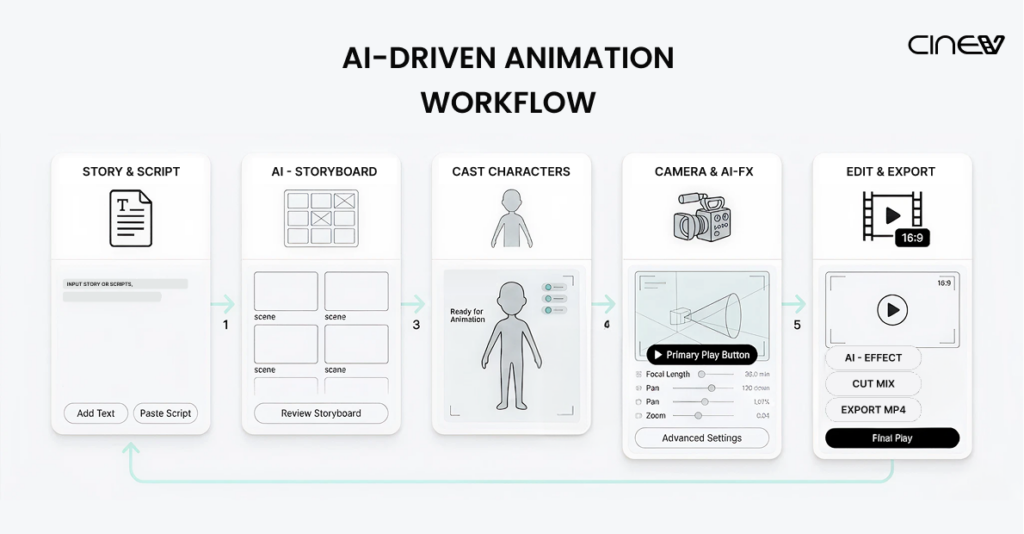
- Storyboard canvas first. You input your story and see a full scene card layout before any video is generated. Pacing and structure decisions happen before you commit to rendering, not after.
- Character replacement built in. Every actor in generated clips can be replaced with your own character. CineV accepts 2D files (JPG, PNG) and 3D formats (VRM, Zepeto exports). Your character is the actor, not an approximation of one.
- Seedance and Kling in one pipeline. Both models are accessible inside CineV, including Seedance 1.0 and 1.5 currently, with 2.0 integration in progress. Free credits are included on signup.
- IP ownership stays with you. Your characters, your output, your rights.
The tools in the comparison above (Sora, Runway, Kling standalone) are strong for single clip generation. For IP holders building a series with a defined character, the production logic is different enough that the tool choice matters.
What This Means If You Have an IP
If you are a webtoon creator, a story writer, or a brand with original characters, the production barrier for an animated series is lower than it was 12 months ago. Not zero, but lower.
The cases above required teams of 6 to 60-day sprints. Solo IP holders are not at that scale yet for full broadcast-quality output. What is realistic now: a short-form series (2 to 5 minutes per episode), consistent enough for a YouTube or social audience, produced without hiring a studio.
The IP holders who are moving first are using this not to replace a studio deal, but to prove their concept. A three-episode run with consistent characters is a stronger pitch than a static pitch deck.
Try It With Your Own Character for free
Free credits are included when you sign up. No payment required to get your first scene running.